Understanding Variables and Data Types in JavaScript

When we first start learning JavaScript, one of the most important concept to understand is variables and data types.
Without variables programs cannot store information.
Let's understand this in the simplest way possible.
What Are Variables?
Imagine you have a box.
You put something inside it:
Your name
Your age
Your student ID
That box has:
A label
A value inside it
In JavaScript:
The box = variable
The label on the box = variable name
The item inside the box = value
Example:
let name = "Viraj";
Here:
name---> box label"Viraj"---> Value inside
Why Do We Need Variables?
Websites and applications need to store information like:
Username
Age
Login status
Scores
Messages
Without variables, JavaScript wouldn't be able to remember anything.
How to Declare Variables in JavaScript?
In JavaScript, we can declare variables using:
varletconst
Let's see how they work.
Using var (old way)
var city = "Mumbai";
console.log(city);
var is the old way of declaring variables (before 2015).
Today we mostly use let and const.
Using let (Recommended for changing values)
let age = 22;
console.log(age);
age = 23;
console.log(age);
let is the modern way to declare variables that can change later.
Using const (Constant value)
const country = "India";
console.log(country);
country = "USA"; // ---> Error
const is used when the value should NOT change.const does not allow reassignment.
Basic Difference: var vs let vs const
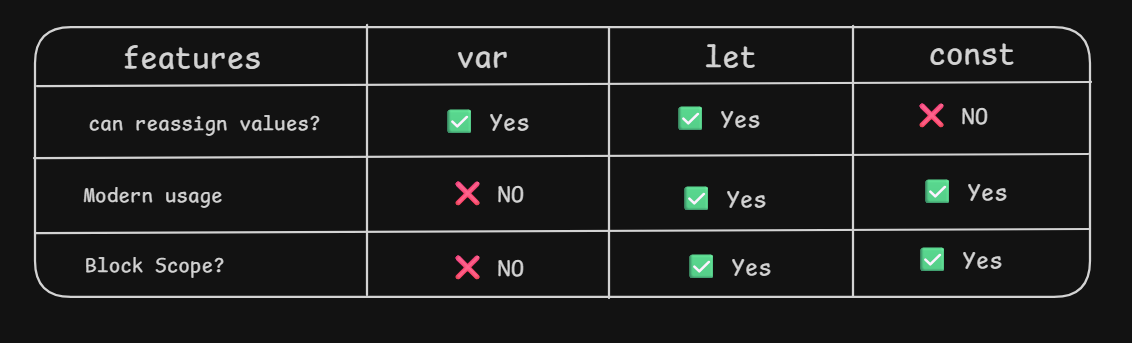
In modern JavaScript:
Use
constby default.Use
letif value needs to be changed.
Avoid var in new code.
What Are Data Types?
Data types define what kind of data a variable stores.
Think of it like labelling the content inside the box.
Primitive Data Types
String
const name = "Viraj";
Anything inside quotes --> string.
Example:
"Hello""JavaScript"'2026'
Number
let age = 22;
let temperature = 27.6;
Used for numbers (both integers and decimals).
Boolean (true/false)
let isStudent = true;
Can only have two values: either true or false .
Null
null means "empty on purpose".
let middleName = null;
Undefined
let score;
console.log(score); //undefined
Undefined means a value is declared but not given a value.
What is Scope?
Scope means:
Where our variable is allowed to be used.
Think of it like rooms in a house.
If you put a box inside a kitchen, you can't access it from bedroom.
Similarly, some variables only work inside certain areas of our code.
Example:
{
    let message = "hello";
    console.log(message); //works
}
console.log(message); // error
Variables declared inside
{ }only works inside those brackets.This is especially true for let and const.
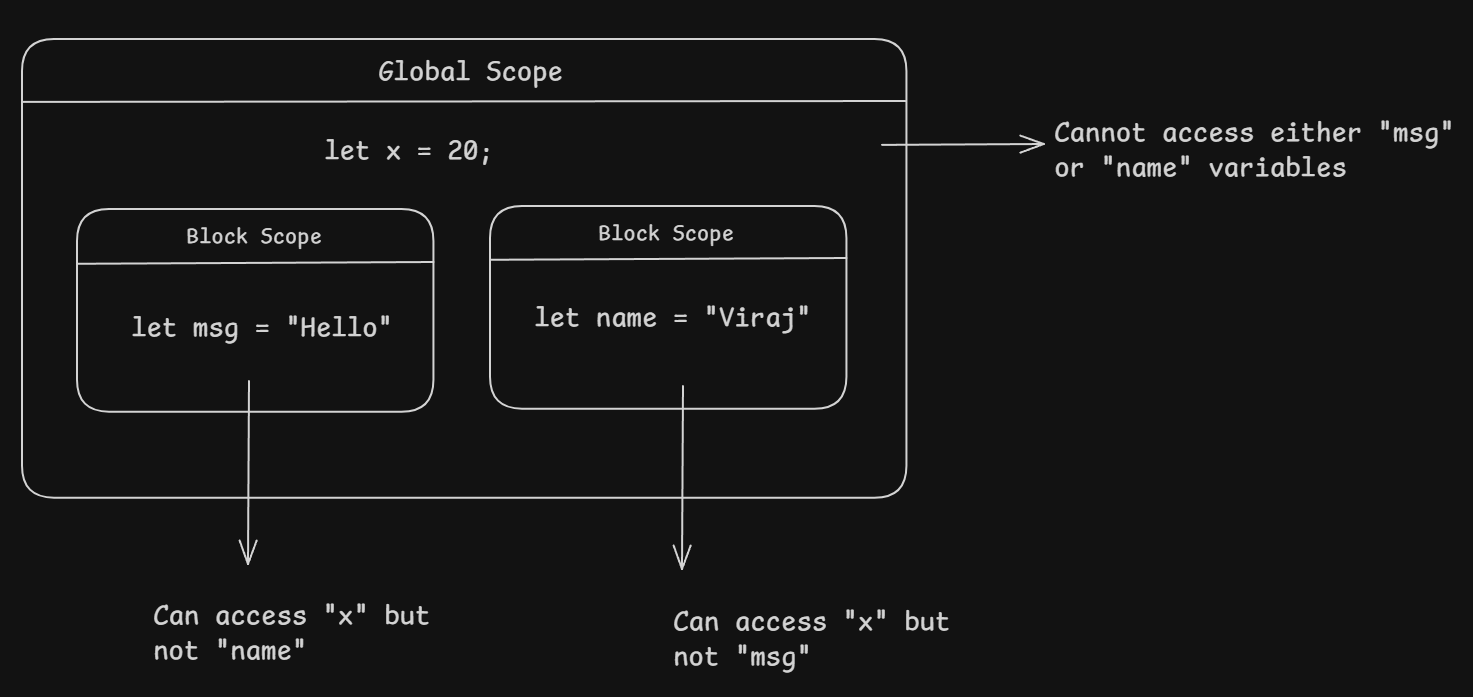
Showing How Values Change
let score = 10;
score = 20;
console.log(score); // 20
Above code works because let let us change the value of a variable.
But const does not let us change the values.
const pi = 3.14;
pi = 3.1415 // error
Mini Practice Assignment
Task:
Declare variables for
Name
Age
isStudent
Print them in console.
Change value using
let.Try changing a
constvariable and observe the error.
Example Solution:
let name = "David";
let age = 20;
const isStudent = true;

console.log(name);
console.log(age);
console.log(isStudent);

//Try Changing
age = 21; //should work
isStudent = false; //error
Final Thoughts
Variables and data types are the foundation of JavaScript.
Key understandings:
What variables are
How to declare them
The difference between
var,letandconst.Basic data types
Master variables and data types — and everything else becomes easier.


