JavaScript Arrays 101

When learning JavaScript, one big question appears:
What if I want to store multiple values together?
That's where arrays come in.
What Are Arrays?
Imagine we want to store a list of fruits:
Apple
Banana
Mango
Orange
Without arrays, we would do something like this:
let fruit1 = "apple";
let fruit2 = "banana";
let fruit3 = "mango";
let fruit4 = "orange";
This works, but what if we had 100 fruits?
That's where arrays come in.
What is an Array and Why do we Need Them?
An array is a collection of values stored in order.
Instead of creating many variables, we store multiple values inside a single variable.
Think of an array like box that holds multiple items.
How To Create An Array?
In JavaScript, we create arrays using square brackets [] .
let fruits = ["Apple", "Banana", "Mango", "Orange"];
Now all fruit names are stored inside one variable: fruits .
Simple. Clean. Powerful.
Accessing Elements Using Index
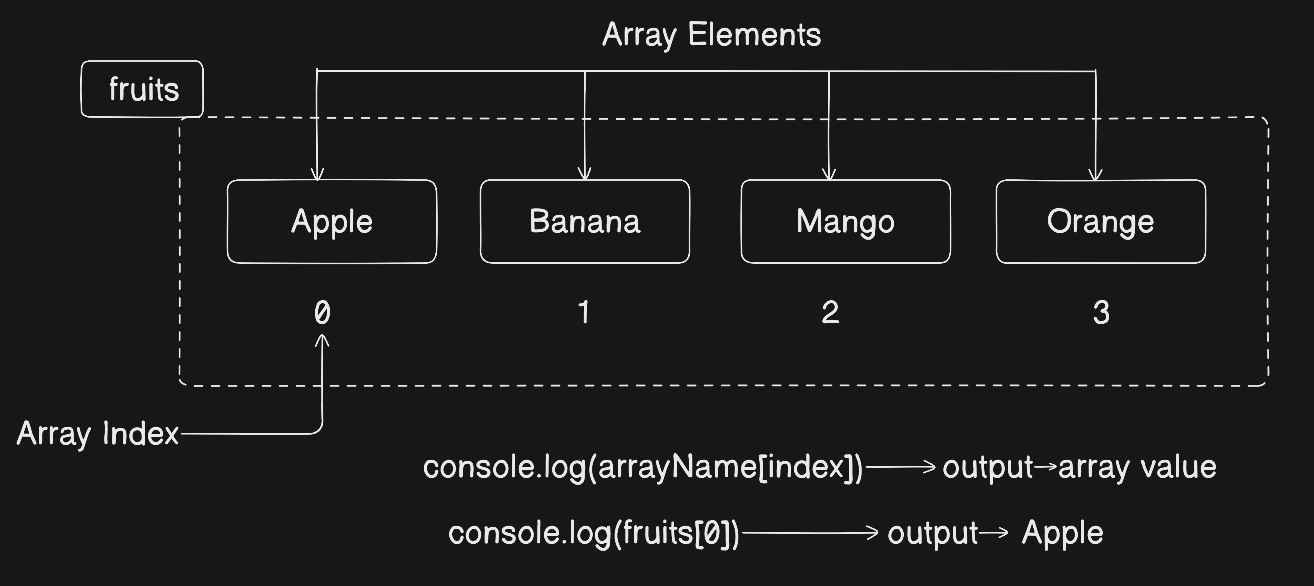
Each item in an array has a position number called an index.
Important: Indexing starts from 0.
let fruits = ["Apple", "Banana", "Mango", "Orange"];

console.log(fruits[0]); // Apple
console.log(fruits[1]); // Banana
So the position look like this:
| Index | Value |
|---|---|
| 0 | Apple |
| 1 | Banana |
| 2 | Mango |
| 3 | Orange |
Updating Elements
We can change any value using its index.
let fruits = ["Apple", "Banana", "Mango", "Orange"];

fruits[1] = "Grapes";

console.log(fruits);
// ["Apple", "Grapes", "Mango", "Orange"]
We simply assign the new value to that index.
The Array Length Property
JavaScript gives us a built-in property called length .
It tells us how many elements are inside the array.
let fruits = ["Apple", "Banana", "Mango", "Orange"];

console.log(fruits.length); // 4
This is extremely useful when looping.
Basic Looping Over Arrays:
To print all elements, we can use a simple for loop:
let fruits = ["Apple", "Banana", "Mango", "Orange"];

for (let i = 0; i < fruits.length; i++) {
  console.log(fruits[i]);
}
How it works:
Starts from index 0
Run until
i < fruits.lengthPrint each element.
This is the most basic and important way to loop over arrays.
Why Arrays Are Better Than Individual Variables
Without Array:
let mark1 = 85;
let mark2 = 90;
let mark3 = 78;
Hard to manage and loop through.
With Arrays:
let marks = [85, 90, 78];
Now we can loop, update, count -- all easily.
Arrays make our code:
Cleaner
Shorter
Easier to maintain
More scalable
Assignment Practice
(Try to solve on your own)
Task 1: Create an array of your 5 favorite movies
let movies = ["Movie1", "Movie2", "Movie3", "Movie4", "Movie5"];
Task 2: Print the first and last element.
console.log(movies[0]);
console.log(movies[movies.length - 1]);
Task 3: Change one value and print updated array
movies[2] = "New Movie Name";

console.log(movies);
Task 4: Loop through the array and print all elements.
for (let i = 0; i < movies.length; i++) {
  console.log(movies[i]);
}
Final Thoughts
Arrays are one of the most important building blocks in JavaScript.
Once you understand:
Creating Arrays
Indexing
Updating values
Using
lengthLooping
You've build a strong foundation.


