I PROMISE it is Simple.

Let's imagine something simple,
You order food at a restaurant.
You don't instantly get your food.
You don't know if it will arrive perfectly cooked.
But you receive a token.
That token is a promise.
So What Exactly is a Promise?
A promise in JavaScript is an object that represents:
The value that will be available in the future.
It's like placing an order at Zomato/Swiggy.
You order the food. --> Promise Created
You are promised that it will be delivered in 30 minutes. --> Promise Pending
It will either be delivered. --> Promise Fulfilled
Or it will be cancelled. --> Promise Rejected.
A Promise immediately returns a Promise object instead of the final result.
This allows JavaScript to continue executing the rest of the code without waiting for the operation to finish.
Because it doesn’t block execution, it is considered asynchronous.
Think of it like: Monkey D. Luffy waiting to become the pirate king which he promised to himself. Either he will become the King of the pirates or he will not (hypothetically). But he will not stop having the adventure.
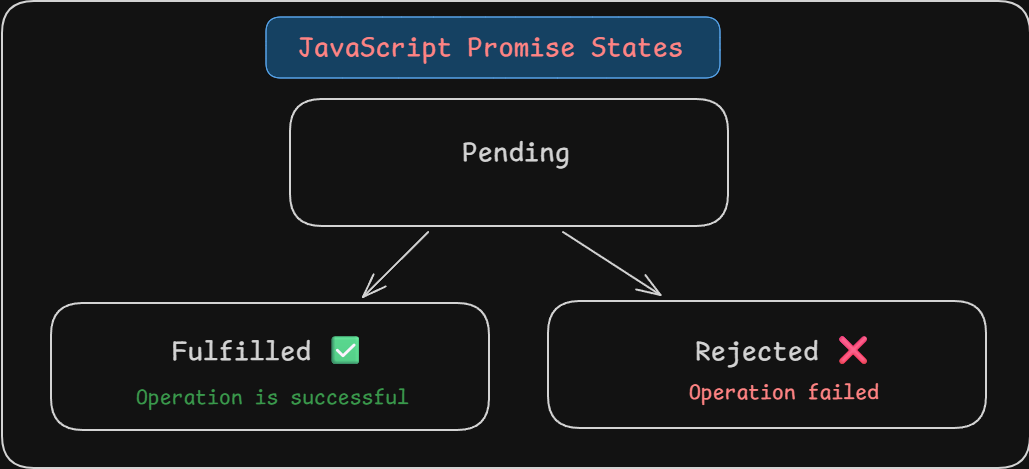
The 3 states of Promises.
Pending
The operation is still running.
Luffy is still waiting to become the King of the pirates.
Fulfilled
The operation completed successfully.
Luffy becomes the Pirate King.
Rejected
The operation failed
Luffy failed to become the Pirate king.
How a Promise is Created?
let luffy = new Promise((resolve, rejected) => {
    let isAdventureOver = true;
    if(isAdventureOver) {
        resolve("Luffy is the Pirate King!!");
    } else {
        reject("Luffy failed to become the Pirate King!!");
    }
})
What's happening here:
resolve()--> Luffy's promise is fulfilled and he becomes the pirate king.reject()--> Luffy's primise is rejected and he failed.
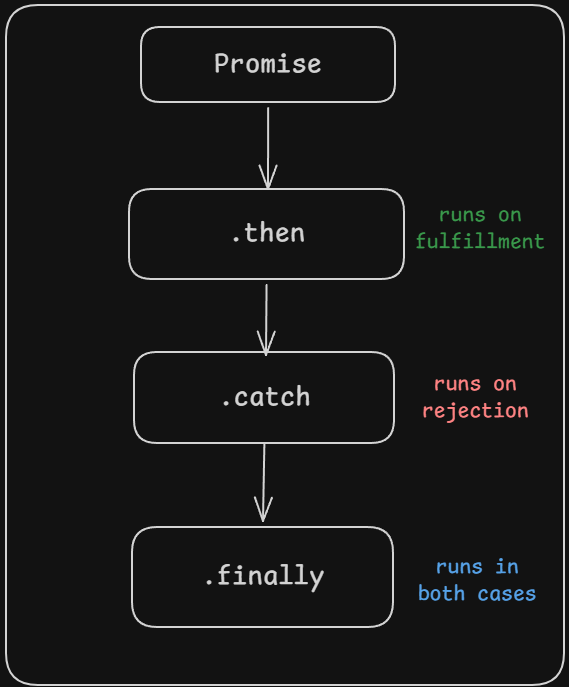
Using .then, .catch and .finally
luffy
    .then((result) => {
        console.log(result);
    })
    .catch((error) => {
        console.log(error);
    })
    .finally(() => {
        console.log("The adventure is over!");
    })
.thenruns when promise is resolved..catchruns when promise is rejected..finallyruns regardless what the outcome is.
Promise.resolve() and Promise.reject()
Promise.resolve(): This method creates the promise that is already fulfilled. It is useful when we have the data already available but our code expects a promise to work with.
const fulfilledPromise = Promise.resovle("Fulfilled Promise!");
Promise.reject(): This method returns a promise that is already rejected with a given reason.
const rejectedPromise = Promise.reject("Rejected Promise!!");
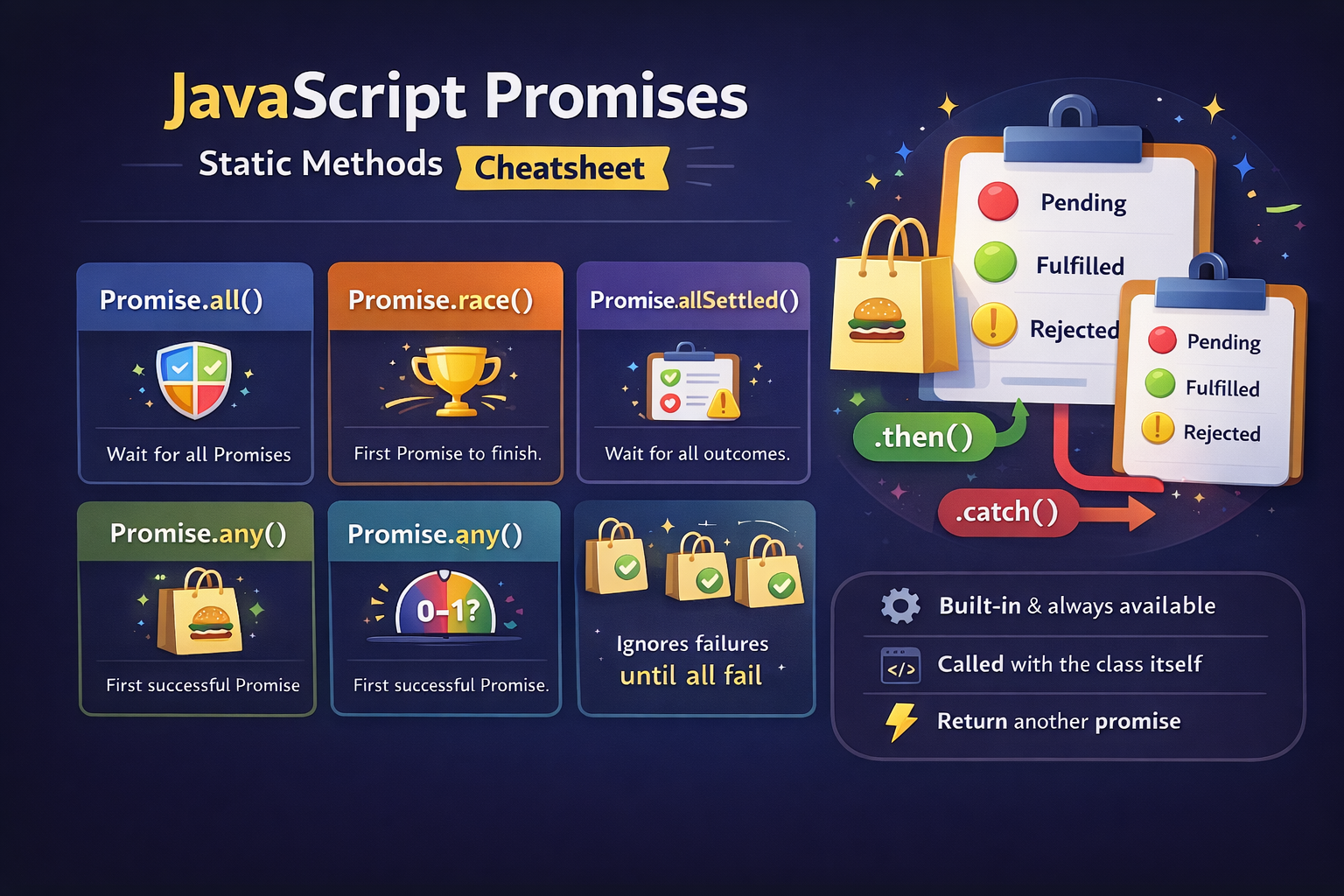
Static Methods of Promise:
Promise.all():
const fight1 = Promise.resolve("Luffy Defeats Crocodile!");
const fight2 = Promise.resolve("Zoro Defeats Mr. 1!");
const fight1 = Promise.resolve("Sanji Defeats Mr. 2 Bon Kurei!");

Promise.all([fight1, fight2, fight3])
    .then((results) => {
        console.log(results);
    })
    .catch((error) => {
        console.log(error);
    })
In Promise.all() all the promises should be fulfilled. if even one of the promise is rejected then it returns error.
Promise.race():
Promise.race([route1, route2, route3])
    .then(result => console.log(`${result} route is cleared!`));
Whichever promise resolved first (success or failure) decides the result. During the traffic if one lane is cleared we take it.
Promise.allSettled():
In avengers not all heroes wins some lose but we see all the result.
Promise.allSettled([ironman, thor, hulk])
    .then((results) => console.log(results));
Promise.allSettled() gives all the promise data doesn't matter if they are resolved or rejected.
Promise.any():
In My Hero Academia if All Might wins the fight the battle is seen as won, even if all the other heroes lost.
Promise.any([AllMight, Endeavor, Hawks, Mirko])
    .then((result) => console.log("At least one hero wins!"))
    .catch((error) => console.log("All Heroes lost!"))
Promise.any() waits for the first successful resolve.
Why Promise Exists?
JavaScript is single threaded.
Imagine a restaurant with one chef.
If the chef:
Cooks
Wash Dishes
Take order
Answer phone calls
Everything would freeze
Instead:
Chef cooks
Waiter handle orders
We get notified when order is ready
That's simply asynchronous behavior.
Promises in JavaScript manages it.


