Arrow Functions in JavaScript: A Simpler Way to Write Functions
JavaScript has evolved a lot over the years. One of the best additions introduced in ES6 (2015) is arrow functions.
They make our code:
Cleaner
Shorter
More readable
More modern
In this article, we will explore how arrow functions reduce boilerplate and make our JavaScript look elegant.
What Are Arrow Function?
Arrow functions are a shorter way to write functions in JavaScript.
Instead of using the function keyword, we use an arrow => .
They are especially useful for:
small functions
One-line operations
Callback functions
How Arrow Function Reduce Boilerplate?
Let's starts with simple example:
Normal Function:
function greet(name) {
    return "Hello " + name;
}
Arrow Function:
const greet = (name) => {
    return "Hello " + name;
}
No function keyword
Cleaner and shorter
More modern style
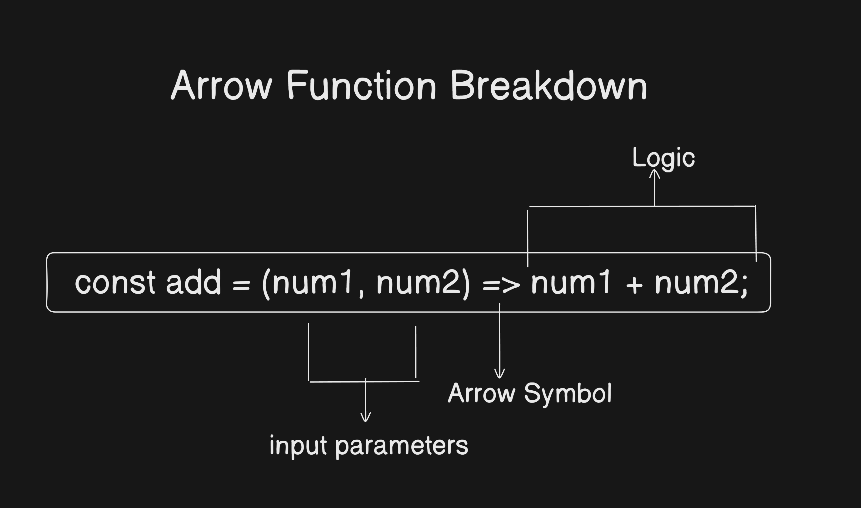
Basic Arrow Function Syntax
General Syntax:
const functionName = (parameters) => {
    //code
}
Example:
const add = (a, b) => {
    return a + b;
}
Arrow Function With One Parameter
If there is only one parameter, we can remove the parentheses.
Normal Function:
function square(num) {
    return num * num;
}
Arrow Function:
const square = num => {
    return num * num;
}
Arrow Function With Multiple Parameters
If there are multiple parameters, parentheses are required.
const multiply = (a, b) => {
    return a * b;
}
Simple and readable.
Implicit Return vs Explicit Return
This is where arrow functions become really powerful.
Explicit Return (with {})
const subtract = (a, b) => {
    return a - b;
}
We use use return inside curly braces.
Implicit Return (without {})
If the function has only one line, we can remove:
curly braces
{}The
returnkeyword
const subtract = (a, b) => a - b;
JavaScript automatically returns the result.
Basic Difference: Arrow Function vs Normal Function
| Feature | Normal Function | Arrow Function |
|---|---|---|
| Syntax | Uses function keyword |
Uses => |
| Length | More verbose | Shorter |
| Readability | Slightly heavier | Cleaner |
| Modern JS style | Traditional | ES6+ Standard |
Converting Normal Functions into Arrow Functions
Example 1: Greeting
Normal Function
function sayHello() {
    return "Hello World";
}
Arrow Function:
const sayHello = () => "Hello World";
Example 2: Add Two Numbers
Normal Function:
function add(a, b) {
    return a + b;
}
Arrow Function:
const add = (a, b) => a + b;
Using Arrow Function inside map()
Arrow functions are very common inside array methods.
Example:
const numbers = [1, 2, 3, 4];

const squares = numbers.map(num => num * num);

console.log(squares);
//[1, 4, 9, 16]
Here:
num => num * numis an arrow functionIt makes the code short and readable
Assignment Ideas:
First try Yourself
Write a normal function to calculate the square of a number.
function square(number) {
    return number * number;
}
Rewrite it using an arrow function.
const square = number => number * number;
Create and arrow function that returns whether a number is even or odd
const oddEven = num => num % 2 === 0 ? "Even" : "Odd";
Use an arrow function inside map() on an array.
const numbers = [2, 4, 6, 8];

const doubled = numbers.map(num => num * 2);

console.log(doubled);
//[4, 8, 12, 16]
Why We Should Use Arrow Function?
Cleaner Syntax
Less boilerplate
Easier to read
Perfect for small functions
Encourages modern JS style
Final Thoughts
Arrow functions make JavaScript more expressive and elegant.
If you're writing modern JavaScript, arrow functions are not optional -- they're essential.
Start small.
Practice with simple math operations.
Use them inside array methods.


